Git使用中的报错情况

git图片
在Git的使用过程中,难免会有这样那样的错误,对于刚开始使用git的小白来说,来记录一下使用过程中报错情况以及怎么处理的

在Git的使用过程中,难免会有这样那样的错误,对于刚开始使用git的小白来说,来记录一下使用过程中报错情况以及怎么处理的

git pull时报错

1
2
3
4
5
6
7
8
9
10
11
12
13
14
15
16
17
18
19
20
21
22
$ git pull
remote: Counting objects: 100, done.
remote: Compressing objects: 100% (57/57), done.
remote: Total 60 (delta 36), reused 3 (delta 0)
Unpacking objects: 100% (60/60), done.
From 180.166.124.26:/var/git/fzc
d8ec768..7c13661 master -> origin/master
Updating d8ec768..7c13661
error: Your local changes to the following files would be overwritten by merge:
protected/modules/m/views/detail/house.php
protected/modules/m/views/list/house.php
protected/modules/web/views/default/list.php
protected/modules/web/views/detail/house.php
protected/modules/web/views/list/house.php
static_src/web/js/houseList/nprogress.js
static_src/web/js/list/nprogress.js
Please commit your changes or stash them before you can merge.
error: The following untracked working tree files would be overwritten by merge:
static_dist/web/js/houseList/houseList-min-50ae65dad4.js
static_dist/web/js/list/list-min-dd27ec4ef4.js
Please move or remove them before you can merge.
Aborting

大意就是说你修改的文件在之前的commit中没有提交,远端的文件和本地的文件冲突
解决方法(出现这样的原因是你在commit之前进行了pull,正确的顺序应该是先进行git addgit commit、然后再进行拉去远端的代码git pull,解决完冲突之后再push)

  1. 如果本地修改的文件不需要提交了,直接放弃就可以了

    1
    $ git checkout --filename

    然后远端的文件就覆盖了你的本地文件,之后就可以git addgit commitgit pullgit push

    1. 还可以保存本地的状态
      1
      2
      3
      4
      5
      6
      7
      8
      9
      10
      11
      12
      13
      14
      15
      16
      17
      18
      19
      20
      21
      22
      23
      24
      25
      //暂存当前文件
      $ git stash [save message]
      save可以对进度进行备注
      //查看当前工作区和版本库区别
      $ git diff HEAD
      //显示已暂存列表
      $ git stash list
      //恢复最近一次暂存区
      $ git stash pop [--index][<stash>]
      []中为可选参数
      --index 不仅恢复工作区,还恢复暂存区
      <stash>指定恢复到具体的进度
      //删除进度(默认删除最新进度)
      $ git stash drop [<stash>]
      //删除所有进度
      $ git stash clear
      //基于进度创建分支
      $ git stash branch <branchname> <stash>

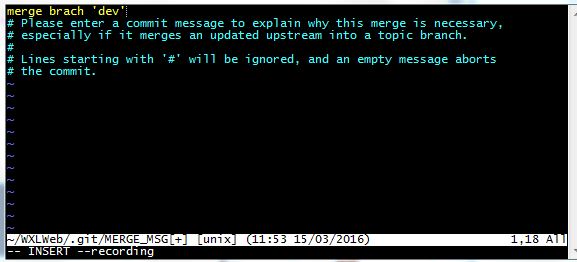
在pull的时候经常会出现下面的情况
image

1
2
Please enter a commit message to explain why this merge is necessary.
请输入提交消息来解释为什么这种合并是必要的

这种轻情况在pull或者合并分支的时候会出现,为什么会出现我也不清楚原因= =

  • 1按键盘字母 i 进入insert模式

  • 2修改最上面那行黄色合并信息,可以不修改

  • 3按键盘左上角”Esc”

  • 4输入”:wq”,注意是冒号+wq,按回车键即可

可以直接进行3、4步,